

Call transcription is the process of converting the speech in a phone or VoIP call into written text, either live during the call or from a recording afterward. Sales and support teams use it to search past conversations, coach reps, run quality assurance, and log call details in a CRM without typing notes.
Table of contents
- Key takeaways
- What is call transcription?
- Call transcription vs. call recording vs. AI summary
- How call transcription works
- What call transcription is used for
- Real-time vs. post-call transcription: which do you need?
- Types of call transcription tools
- Before you turn it on: what to check
- Platform, plan, permissions, and language
- Recording requirements and data handling
- How 5 platforms handle call transcription differently
- How to set up call transcription on a VoIP or contact center platform
- Step 1: Open admin settings and choose the scope
- Step 2: Enable recording if required, then transcription
- Step 3: Set mode, language, and custom vocabulary
- Step 4: Configure storage, CRM sync, and access
- Step 5: Make a test call and review the transcript
- How accurate is call transcription?
- What causes errors, and what to check by hand
- 7 ways to improve call transcription accuracy
- Troubleshooting common call transcription problems
- No transcript, or it shows up late
- Missing sections, wrong words, or mixed-up speakers
- Transcript doesn't sync to the CRM or ticket
- How much does call transcription cost?
- Pricing models
- How to estimate your budget
- Privacy, consent, and security
- Notice, consent, and legal basis
- Protecting personal and payment data
- Access, retention, and AI vendors
- Rollout checklist
- FAQ
- Can you transcribe a call without recording it?
- Is call transcription legal?
- Can I transcribe phone calls on my iPhone or Android?
- Does call transcription support multiple languages and accents?
- Can I edit or download transcripts?
- Does call transcription translate calls automatically?
- Conclusion
- Product sources checked
This guide explains how call transcription works, when to pick real-time or post-call, how setup differs across real platforms (Zoom Phone, Webex Calling, HubSpot, Dynamics 365, Zendesk), what it costs, how accurate it really is, and what US and EU consent rules mean for your rollout.
Key takeaways
Call transcription produces a text transcript, usually with speaker labels and timestamps. It's different from a call recording (audio) and an AI summary (condensed notes).
Real-time transcription supports live captions and agent assist; post-call transcription is better for QA, CRM logging, and analytics.
Platform rules vary a lot: some only transcribe recorded calls, some show live text only to you and don't save it.
Raw speech-to-text APIs cost fractions of a cent per minute; transcription bundled in phone systems and CRMs is usually priced per user or as an add-on.
Recording and transcribing calls triggers consent rules. Several US states require all parties to consent.
What is call transcription?
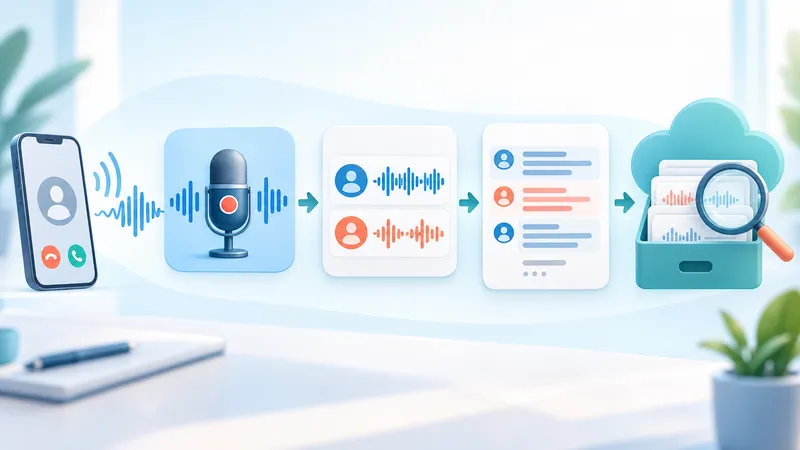
Call transcription creates a transcript, a text version of the conversation. Depending on the platform, it can include speaker labels, timestamps, and keyword search. It isn't automatically a perfect word-for-word record; AI transcripts contain recognition errors, and some tools clean up filler words by default.
Call transcription vs. call recording vs. AI summary
| Feature | Output | Best for |
|---|---|---|
| Call recording | Audio file | Hearing exact words and tone |
| Call transcription | Text transcript | Reading, searching, quoting, analytics |
| AI summary | Short notes generated from the transcript | Key points, next steps, CRM notes |
A summary can drop details; a transcript can mishear them. For anything important, check against the audio if you're allowed to keep it.
How call transcription works
The system captures call audio, either live or from a recording.
Automatic speech recognition (ASR), also called speech-to-text, converts speech into words.
The engine adds punctuation and formatting.
Speaker diarization labels who said what, and timestamps are attached.
The transcript is stored in the phone system or pushed to a CRM, help desk, or analytics tool.
Speaker labeling groups turns of speech; it doesn't verify identity. Accuracy improves a lot with dual-channel (stereo) recording, where the agent and the customer are captured on separate audio channels. With a single mixed channel, crosstalk and misattributed speakers are more common.
What call transcription is used for
Sales: review objections, pricing discussions, and commitments without replaying the call; feed conversation intelligence tools.
Customer support: attach the conversation to the ticket so the next agent has context.
Quality assurance and coaching: score calls and find training moments by searching keywords.
Compliance: check that required disclosures were read.
Accessibility: live captions help callers and agents who are deaf or hard of hearing.
Downstream AI: summaries, sentiment, and topic analysis all start from the transcript.
Real-time vs. post-call transcription: which do you need?
| Criteria | Real-time | Post-call |
|---|---|---|
| When it runs | During the call | After the call ends |
| Latency | Short delay; text may be revised as it streams | Wait for processing to finish |
| Best for | Live captions, agent assist, real-time alerts | Review, QA scoring, CRM logging, analytics |
| Watch out for | Some tools don't save live transcripts | Results still need spot-checking |
Real-time isn't always better and post-call isn't always cheaper; check each vendor's pricing. Live translation and suggested replies are separate features, not part of transcription by default. For more on streaming engines, see our guide to real-time speech-to-text.
Types of call transcription tools
| Type | Examples | Good fit when |
|---|---|---|
| Built into your phone system | Zoom Phone, Webex Calling, RingCentral, Dialpad, Aircall | You want transcription without new integrations |
| Built into your CRM or help desk | HubSpot, Zendesk, Dynamics 365 Contact Center | Transcripts must live on the contact or ticket record |
| Conversation intelligence | Gong and similar sales platforms | You need coaching, deal insights, and analytics on top |
| Speech-to-text APIs | Amazon Transcribe, Twilio, Vonage, Deepgram | You're building a custom pipeline or need control over data flow |
| On-device phone features | iPhone call recording (iOS 18.1+), Pixel Call Notes | Individuals transcribing personal or small-business calls |
If you mostly need transcripts of video meetings rather than phone calls, see our comparison of AI meeting note takers and the roundup of transcription software.
Before you turn it on: what to check
Platform, plan, permissions, and language
Confirm four things in the vendor's official docs:
The platform supports transcription for your call type (inbound queue, outbound dialer, shared lines, voicemail).
Your plan or add-on includes it, for every user who needs it.
Your account has permission to enable it and to view results.
Your languages are supported in the mode you need (real-time and post-call lists often differ) and in your region.
What the underlying speech engine can do doesn't mean the product built on it exposes that capability.
Recording requirements and data handling
Find out whether transcription requires call recording to be on.
Define the purpose, the notice callers hear, and your legal basis for processing.
Decide where transcripts are stored, who can access them, and for how long.
How 5 platforms handle call transcription differently
| Platform | Notable rule or behavior | Lesson for rollout |
|---|---|---|
| Zoom Phone | Call live transcription is visible only to the user who turns it on, and Zoom doesn't retain these live transcripts. | Don't rely on live transcription if you need a stored record. |
| Webex Calling | Requires a Webex Calling Professional license; admins enable it at org, location, or user level; each user turns it on independently and sees it only for themselves. Supports a defined list of roughly 15 languages. | Check license, location, device, and language before buying. |
| HubSpot | Automatic transcription applies only to recordings by users with Sales Hub or Service Hub Professional or Enterprise seats, with call recording on and a supported calling provider. | Not every recording that lands in the CRM gets transcribed. |
| Zendesk | Only recorded calls can be transcribed and summarized; requires the Copilot or QA add-on. | Transcription depends on your recording settings. |
| Dynamics 365 Contact Center | Admins choose Transcription or Transcription and recording, with an automatic or manual start, plus optional agent pause/resume. | "Have a transcript" and "keep the audio" can be separate decisions. |
For developer platforms such as Vonage or Twilio, transcription is an integration project: you record or stream audio, connect a speech-to-text service, and ideally keep agent and customer on separate channels. It isn't a CRM toggle. This table isn't a "best of" ranking; it shows that permissions, storage, and output must be verified per product. Sources are linked at the end.
How to set up call transcription on a VoIP or contact center platform
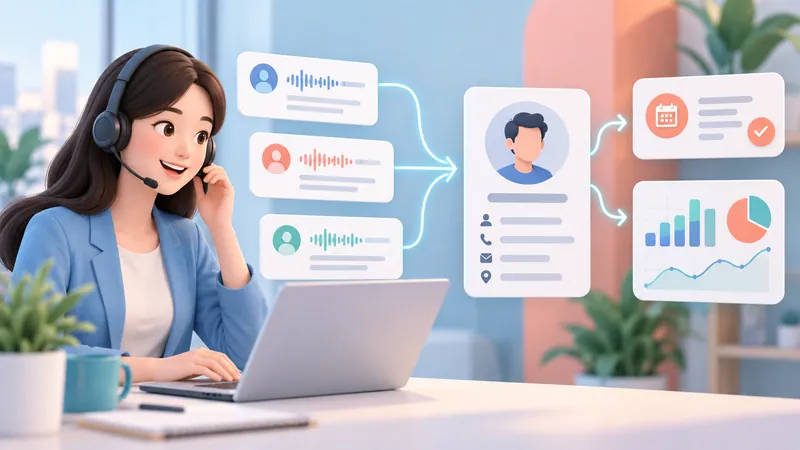
This is a general workflow. Menu names and options differ by vendor.
Step 1: Open admin settings and choose the scope
Sign in with an admin account.
 Try NoteMeeting Free →
Summarize your meetings & videos automatically with NoteMeeting
Google Meet, Zoom, YouTube, Podcast — all in one extension.
Find the relevant area, typically Voice, Calling, AI, or Transcription.
Pick the numbers, queues, or user groups to include.
Start with a small pilot group to check quality and cost, and confirm the screen shows the pilot scope before you save.
Step 2: Enable recording if required, then transcription
Finish your notice and consent setup first.
Turn on recording if the product requires it, then turn on transcription.
Choose automatic or manual start if offered, and save.
Automatic vs. manual is about when capture starts; real-time vs. post-call is about when processing happens. Don't assume the setting applies to past calls. Whether pausing the recording also pauses transcription depends on the product.
Step 3: Set mode, language, and custom vocabulary
Mode: real-time or post-call, if both are available.
Language: set the primary language; test auto-detection and language switching separately.
Vocabulary: add product names, competitor names, and jargon if the tool supports custom vocabulary or keyword boosting.
Add internal product terms, not customer names. Custom vocabulary helps but doesn't guarantee every name or number is recognized.
Step 4: Configure storage, CRM sync, and access
Storage: call history, workspace, or record type where transcripts live.
CRM: enable the integration with least-privilege access and check how calls are matched to contacts.
Access: who can view, edit, or export transcripts.
Data: retention period and automatic redaction of sensitive data, if available.
A calling integration with your CRM doesn't mean transcripts sync automatically. Verify that text lands on the right record and only authorized people can see it.
Step 5: Make a test call and review the transcript
Run a test call with consent and dummy data, then open the call details and check:
The text is complete and in the right language.
Speaker labels and timestamps make sense.
Amounts, dates, and product names match what was said.
The transcript is attached to the correct CRM record and not visible outside its permission scope.
Example: a support team finds that appointment dates are being transcribed wrong. They check the audio, fix the language setting, and re-test before rolling out further.
How accurate is call transcription?
Not 100%. Accuracy depends on audio quality, language, accent, and the engine, so there's no single accuracy number that applies to every call. Vendors often quote 90%+ on clean English audio; phone audio with noise, crosstalk, or accents scores lower. The standard way to measure it is word error rate (WER), and you should measure it on your own calls, not rely on vendor benchmarks.
What causes errors, and what to check by hand
Common error sources: background noise, dropped VoIP audio, people talking over each other, strong accents, code-switching between languages, and uncommon terms.
Always verify: names, dollar amounts, dates, commitments, and anything used to evaluate an employee.
Don't use an unreviewed transcript as the only basis for decisions that affect customers or staff.
7 ways to improve call transcription accuracy
Give agents decent headsets with noise-canceling mics.
Keep the network stable to avoid VoIP packet loss.
Reduce background noise where calls are taken.
Set the correct recognition language.
Record agent and customer on separate channels if your platform supports it.
Add industry vocabulary where supported.
Test with a representative sample of real calls, accents, and scenarios.
A good network preserves audio quality but doesn't guarantee correct recognition on its own.
Troubleshooting common call transcription problems
No transcript, or it shows up late
Is the call within the scope where transcription is enabled?
Are the plan and viewing permissions still valid?
Does a recording exist, if the product requires one?
Is the system still processing, or did it fail?
Have you hit a usage quota, or is there a service incident?
Distinguish "no transcript was created" from "you don't have permission to see it." If it's still processing, check the vendor's expected turnaround rather than waiting an arbitrary amount of time.
Missing sections, wrong words, or mixed-up speakers
| Symptom | Check | Action |
|---|---|---|
| Missing sections | Paused capture, dropped connection | Compare with the audio and call status |
| Wrong words or numbers | Language setting, noise | Fix the configuration and re-test |
| Mixed-up speakers | Crosstalk, diarization support | Check labels; switch to dual-channel if available |
| Sentences nobody said | Generation error | Mark as unverified and report it |
Check the transcript and the summary separately; an error in the summary doesn't necessarily come from speech recognition.
Transcript doesn't sync to the CRM or ticket
Confirm the transcript exists in the calling platform.
Check the integration connection and write permissions.
Check contact-matching rules and the field that receives the text.
Review sync status or logs if available.
When contacting support, send the call ID, time, and error through a secure channel. Don't grant full admin access or bulk re-sync as a first step.
How much does call transcription cost?
Pricing models
Per minute (APIs): for example, as of 2026 Amazon Transcribe lists $0.006/min for standard batch, $0.01/min for streaming, and $0.03/min for Call Analytics in US East (tier 1), billed per second.
Per user per month: VoIP and contact center plans are usually billed per user per month, but transcription is often reserved for higher tiers or add-ons, so check each vendor's pricing page for which tier includes it.
Add-ons: CRMs and help desks often gate transcription behind an AI add-on or premium seat.
Also budget for recording storage, summaries, redaction, and integration work, not just the transcription line item.
How to estimate your budget
Estimated cost = billable minutes × per-minute rate + fixed fees + add-ons.
Subtract any included minutes, then check rounding, whether each channel is billed separately, and whether real-time and post-call are priced differently.
Hypothetical example: 10,000 call minutes a month × $0.03/min = $300, before storage, add-ons, and taxes. Replace the rate with your vendor's and adjust using pilot data.
Privacy, consent, and security
Notice, consent, and legal basis
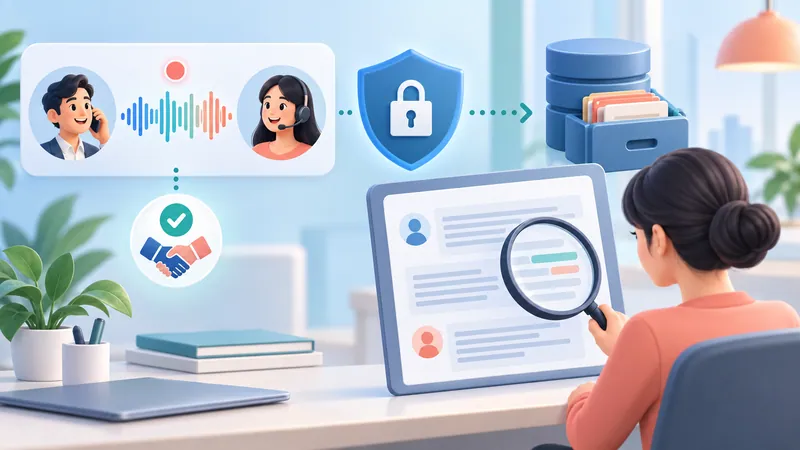
US: federal law allows one-party consent, but about a dozen states, including California, Florida, Illinois, Maryland, Massachusetts, Montana, New Hampshire, Pennsylvania, and Washington, require consent from all parties. For calls across state lines, many businesses follow the strictest rule.
EU/UK: the GDPR requires a lawful basis, clear notice, and data minimization for recording and transcription.
Plan what happens when a caller declines (for example, continue without recording or transcription).
A "this call may be recorded" message doesn't automatically prove valid consent everywhere. This isn't legal advice; check with counsel before rolling out.
Protecting personal and payment data
Transcripts contain personally identifiable information (PII) such as names, emails, and phone numbers, plus sensitive details that are hard to detect with patterns, like health conditions, family circumstances, or complaints.
Collect only what you need and turn on redaction if available.
Use a secure payment flow for card data in PCI DSS scope; never store the card security code (CVV) after authorization.
For healthcare calls in the US, confirm the vendor will sign a HIPAA business associate agreement.
Review audio, transcripts, summaries, and exports separately.
Redacting the text doesn't remove the data from the audio recording.
Access, retention, and AI vendors
Grant least-privilege access by role.
Control downloads and keep access logs.
Set retention periods and a deletion process that covers every copy.
Verify where data is processed and stored, and which subprocessors are involved.
Read the data processing agreement and the AI training policy for the specific service.
A big vendor name or a redaction feature doesn't guarantee compliance on its own.
Rollout checklist
Plan and permissions cover every user who needs transcription.
Scope (numbers, queues, teams) is correct.
Mode and language are set.
Recording is on, if required.
Authorized users can find transcripts.
The CRM receives text on the correct record.
Consent, legal basis, and security are reviewed.
Pilot quality and budget meet your targets.
FAQ
Can you transcribe a call without recording it?
It depends on the platform. Some process audio live without keeping a long-term recording (Zoom Phone's live transcription, for example), while others, like Zendesk, only transcribe recorded calls. Even without stored audio, you're still processing personal data, so check temporary storage and data policies.
Is call transcription legal?
Generally yes, with proper notice and consent. In the US, all-party consent states require everyone on the call to agree; under the GDPR you need a lawful basis and clear notice. Get legal advice for your specific case.
Can I transcribe phone calls on my iPhone or Android?
Yes. On iOS 18.1 and later, iPhone can record calls and save the recording and transcript in the Notes app, in supported regions and languages; everyone on the call hears a notice. Recent Pixel phones offer Call Notes, which records, transcribes, and summarizes on the device.
Does call transcription support multiple languages and accents?
It varies by product, version, region, and mode. Check the current language list, then test with real accents, jargon, and mixed-language calls before rolling out.
Can I edit or download transcripts?
It depends on the feature and your permissions. Some platforms export TXT or caption files such as SRT. For audit purposes, keep the original and the edit history instead of overwriting.
Does call transcription translate calls automatically?
Not by default. Transcription converts speech to text; translation converts text into another language. Live translation is a separate feature that may cost extra. See our guide to voice translators for options.
Conclusion
Call transcription makes conversations searchable and supports sales, support, and QA, but only when it's configured correctly, spot-checked for accuracy, and governed with clear consent and data rules.
Start with a small group of calls, review the transcripts and the CRM sync, and expand only when quality, cost, and security meet your requirements.
For the underlying technology, read what speech-to-text is. To measure recognition errors, see our guide to word error rate (WER).
Product sources checked
Microsoft: Configure call recording, transcription, and real-time translation
Webex Calling: Enable and manage closed captions and call transcriptions
Reviewed September 2026. Based on official vendor documentation, not head-to-head testing of contact center platforms.