

An AI meeting note taker is the difference between leaving a call with a clean summary already in your inbox and leaving a call with 30 minutes of writeup ahead of you. The category exploded in 2024–25 and now has dozens of credible options — from browser extensions to standalone wearables — which makes the buying decision harder, not easier. We compared the eleven that actually deserve a shortlist in 2026, with deep reviews, transparent pricing, and a decision tree that gets you to the right tool in two minutes.
Table of contents
- Top picks at a glance
- How we picked these 11
- Quick comparison table
- The 11 best AI meeting note takers in 2026
- 1. Krisp — best bot-free AI meeting note taker
- 2. Otter.ai — best overall
- 3. Fireflies.ai — best for sales and CRM-driven teams
- 4. Fathom — best free tier
- 5. Notta — best for multilingual teams
- 6. Plaud Note — best for in-person meetings
- 7. Read.ai — best for meeting analytics
- 8. Granola — best for Mac power users
- 9. tl;dv — best for clip sharing
- 10. Sembly — best for multi-speaker calls
- 11. NoteMeeting — best for Google Meet + multilingual
- AI meeting note takers for in-person meetings
- How to choose: a 2-minute decision tree
- Pricing tiers explained
- 5 marketing claims to ignore
- Limitations to know before you adopt
- Frequently asked questions
- Which is the most accurate AI meeting note taker?
- What's the best free AI meeting note taker right now?
- Which AI note taker works best for in-person meetings?
- Is there an AI note taker that doesn't join the meeting as a bot?
- Are AI note takers safe for confidential meetings?
- Do these AI note takers work with Zoom, Google Meet, and Microsoft Teams?
- Conclusion
Top picks at a glance
Best bot-free capture: Krisp — records online and in-person conversations without adding a bot to the call.
Best overall: Otter.ai — strongest balance of accuracy, integrations, and price.
Best free tier: Fathom — unlimited recordings on Zoom, Meet, and Teams with no time cap.
Best for in-person meetings: Plaud Note — a pocket-sized hardware recorder that pairs with a phone app.
Best for enterprise: Fireflies.ai — deepest CRM and admin controls; SOC 2 + HIPAA available.
How we picked these 11

We scored each tool on six criteria, weighted by what most teams actually care about:
Transcription accuracy on real-world calls (clean audio, accents, overlapping speech).
Summary and action-item quality — does the output read like something a human would write, and does it actually capture decisions?
Integrations with the platforms teams already use (Zoom, Google Meet, Teams, Slack, CRMs, project tools, Notion).
Pricing transparency and the honesty of the free tier — many vendors advertise "free" but cap usage so tightly it's a demo, not a tier.
Privacy and compliance posture — SOC 2, GDPR, HIPAA, data residency, training-data opt-out.
Language coverage — accuracy outside English is highly uneven; vendors that quietly excel here get credit.
Tools below are listed in approximate order of how broadly applicable they are, not strict ranking — the right pick depends on your specific use case, which is what the rest of this guide is about.
Quick comparison table
Tool |
Best for |
Free tier |
Paid from |
Languages |
In-person |
Bot-free |
|---|---|---|---|---|---|---|
Krisp |
Bot-free capture |
7-day trial |
~$8/mo (annual) |
17+ |
Yes (desktop + mobile) |
Yes |
Otter.ai |
Overall English |
300 min/mo |
~$10/mo |
3+ |
Mobile app |
Mobile only |
Fireflies.ai |
Sales / CRM |
Limited |
~$10/mo |
60+ |
Mobile app |
No |
Fathom |
Free unlimited |
Unlimited |
~$15/mo |
20+ |
No |
No |
Notta |
Multilingual |
120 min/mo |
~$9/mo |
50+ |
Mobile app |
Optional |
Plaud Note |
In-person |
300 min/mo |
~$80 device + sub |
50+ |
Yes (hardware) |
Yes |
Read.ai |
Analytics |
Yes |
~$15/mo |
20+ |
No |
No |
Granola |
Mac users |
Trial only |
~$14/mo |
10+ |
Yes (Mac mic) |
Yes |
tl;dv |
Clip sharing |
Yes |
~$18/mo |
30+ |
No |
No |
Sembly |
Multi-speaker |
1h/mo |
~$10/mo |
40+ |
Mobile app |
No |
NoteMeeting |
Google Meet + EN/VI |
Yes |
~$9/mo |
10+ |
No |
Extension |
The 11 best AI meeting note takers in 2026
1. Krisp — best bot-free AI meeting note taker
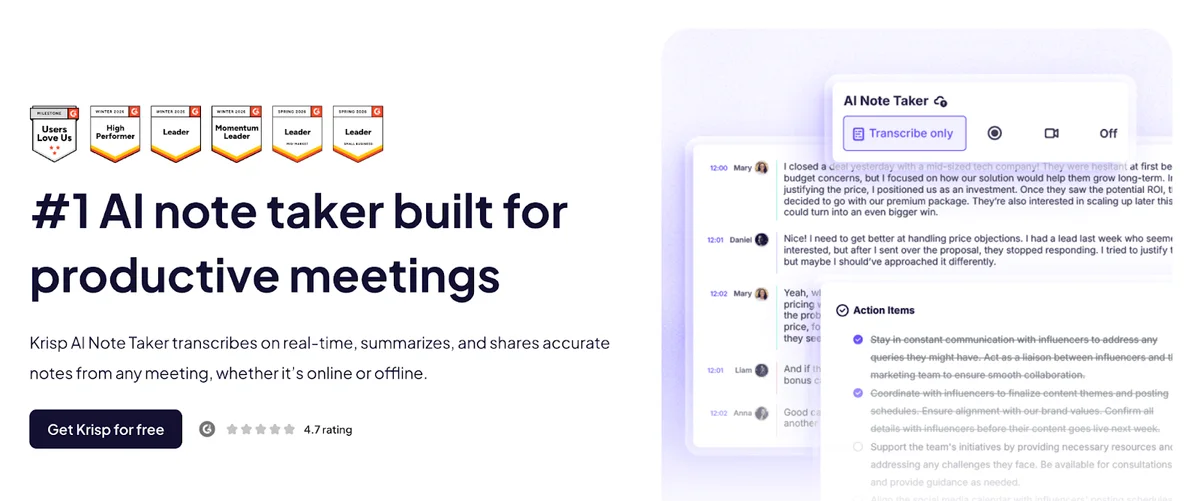
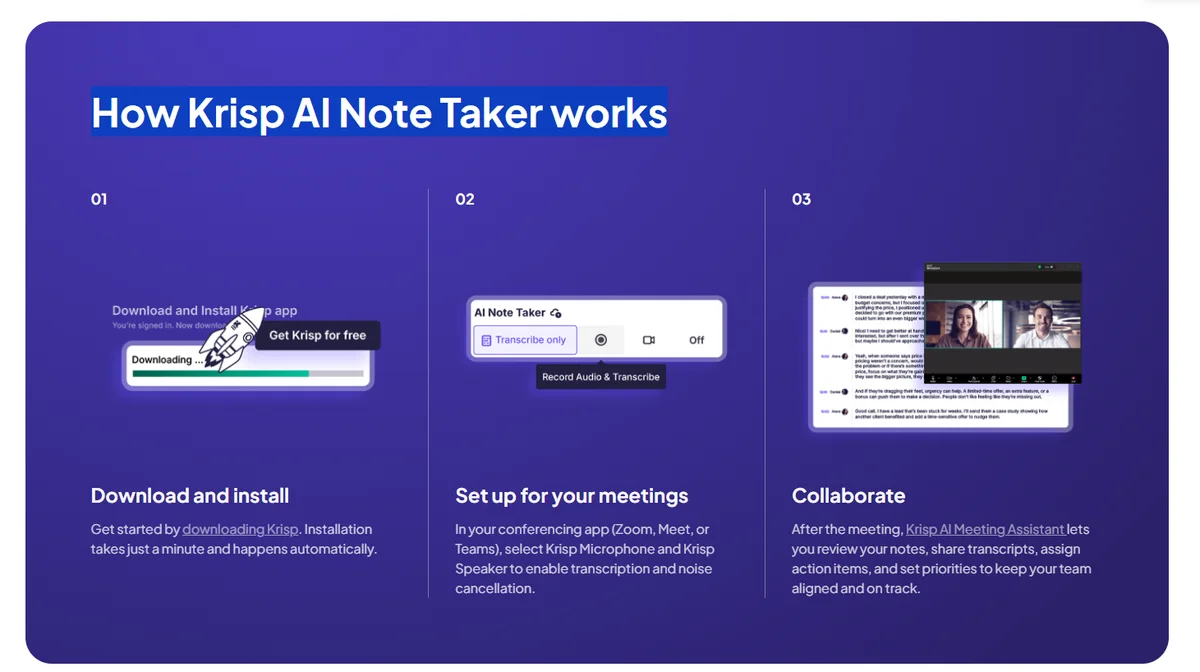
Krisp AI Note Taker is a strong choice for teams that want AI meeting notes without adding a bot to the call. It captures conversations, transcribes them in real time, and summarizes online and in-person conversations directly through the Krisp app, so meetings can be recorded without another participant appearing in Zoom, Google Meet, Microsoft Teams, Slack huddles, or Webex. Krisp’s meeting notes and transcriptions are available in 17+ languages, with noise cancellation helping maintain clear communication in noisy environments and accent conversion helping overcome accent challenges in multilingual conversations.
Pros: bot-free meeting capture; works with online meetings and in-person conversations; live and post-meeting transcriptions; AI chat; built-in noise cancellation and accent conversion; desktop and mobile apps; advanced integrations with CRMs and project management tools; full enterprise compliance stack.
Cons: the mobile app doesn’t support noise cancellation.
Best for: teams and individuals who want a bot-free AI meeting note taker that works across platforms and meeting types, especially people who regularly switch between online and in-person conversations or work across different languages and accents.
2. Otter.ai — best overall
Otter is the most polished generalist in the category. Live transcription is fast and accurate on clean English audio, the mobile app records in-person meetings well, and the post-meeting summaries (Otter calls them "Otter AI Chat") are useful without being over-stylized. Native integrations cover Zoom, Google Meet, and Microsoft Teams; Salesforce and HubSpot are paid add-ons.
Pros: excellent English transcription accuracy, mature mobile experience, broad platform support, transparent pricing.
Cons: non-English performance trails Notta and Sembly, free tier capped at 300 minutes per month, advanced features locked behind business tier.
Best for: English-speaking teams that want one tool that handles online and in-person meetings without thinking about it.
3. Fireflies.ai — best for sales and CRM-driven teams
Fireflies leans hardest into sales workflows. The bot auto-joins calendar invites, transcribes, then writes back into Salesforce, HubSpot, Pipedrive, or Zoho — populating call notes, stage updates, and even custom fields based on prompts you define. The "AI apps" feature lets you set up custom analyzers that scan transcripts for objections, competitor mentions, or buying signals.
Pros: deepest CRM integrations in the category, customizable AI prompts, strong admin and team management, available with HIPAA BAA on enterprise tier.
Cons: bot-based only (no local capture), bigger learning curve than Otter or Fathom, free tier is more of a trial.
Best for: sales orgs, customer success teams, anyone whose meetings end with CRM updates.
4. Fathom — best free tier
Fathom built its reputation on a genuinely generous free plan: unlimited recording on Zoom, Google Meet, and Microsoft Teams, AI-generated summaries, and basic action item extraction — at no cost for individual use. The paid plans add team features, integrations, and Ask Fathom (a chat-with-your-meetings interface).
Pros: the only major tool with truly unlimited free recording, clean and minimal UI, fast summary generation.
Cons: no in-person meeting support (no mobile app for live recording), fewer integrations than Otter or Fireflies, advanced analytics are paid-only.
Best for: individual users, freelancers, and small teams who don't want a recurring bill.
5. Notta — best for multilingual teams
Notta supports 50+ languages and is one of the few tools where Asian-language transcription (Mandarin, Japanese, Korean, Vietnamese, Thai) is genuinely good — not an afterthought. The translation feature handles cross-language meetings reasonably well, and live transcripts can be set to display two languages side by side.
Pros: strong Asian-language support, real-time translation, mobile app handles in-person recording, fair entry-level pricing.
Cons: summary quality lags Otter and Fireflies on long English calls, integrations are thinner than the leaders.
Best for: APAC-based teams, multinational companies with mixed-language meetings, anyone whose primary language isn't English.

Summarize your meetings & videos automatically with NoteMeeting
Google Meet, Zoom, YouTube, Podcast — all in one extension.
6. Plaud Note — best for in-person meetings
Plaud is the breakout hardware AI note taker. The device is a credit-card-sized recorder you carry in a pocket or stick to your phone with MagSafe; it captures the meeting locally, then syncs to the Plaud app where the audio is transcribed and summarized by Plaud's cloud AI. Battery lasts most of a workday on a single charge.
Pros: purpose-built for in-person meetings (face-to-face, conference rooms, on-site visits), no bot in your call, excellent audio capture in noisy rooms thanks to dual-mic design.
Cons: requires a hardware purchase (~$80–170 depending on model) plus an ongoing transcription subscription, not useful for online meetings (where bot-based tools are easier).
Best for: field sales, consultants, lawyers, journalists, anyone whose meetings happen across a table rather than across a screen.
7. Read.ai — best for meeting analytics
Read.ai goes one layer beyond notes: in addition to summaries and action items, it scores meetings on talk-time balance, engagement, sentiment, and "meeting health." For managers trying to coach team meeting hygiene — fewer monologues, more participation, sharper agendas — these analytics actually move behavior.
Pros: unique meeting-effectiveness metrics, integrates with calendar to surface meeting trends over time, polished web app.
Cons: bot-only (joins as a participant), the analytics layer is meaningful only at scale (small teams won't get statistically useful data).
Best for: people leaders, sales managers, ops teams that want to measure and improve meeting culture.
8. Granola — best for Mac power users
Granola lives in your Mac menu bar, doesn't join the call as a bot, and combines your typed notes with the AI-generated transcript. The hybrid approach is its killer feature: your handwritten thinking gets enriched with the AI's recall, instead of replaced by it. Currently Mac-only (Windows beta in progress).
Pros: no bot in the meeting (privacy and politeness wins), human-AI hybrid notes, fast and lightweight.
Cons: macOS-only at time of writing, no live transcript display during the call (notes appear after), thinner integrations than Otter or Fireflies.
Best for: founders, designers, and engineers on Mac who want their own notes augmented, not replaced.
9. tl;dv — best for clip sharing
tl;dv excels at the specific job of turning long meetings into short, shareable clips. Highlight a moment during the call, and tl;dv generates a 30-second video snippet you can drop into Slack or share with stakeholders who skipped the meeting. The library of clips becomes a searchable knowledge base over time.
Pros: best-in-class clip and highlight workflow, generous free tier, strong UX for product and customer-discovery teams.
Cons: as a general note-taker it's average — Otter does that better; the clips are the differentiator.
Best for: product managers, UX researchers, customer-discovery teams who want a shareable evidence library from interviews and demos.
10. Sembly — best for multi-speaker calls
Sembly's speaker diarization holds up better than most when six people are on a call and the audio overlaps. It also produces a structured "Glance View" output (decisions, action items, risks, projects, dates) that some teams find more scannable than narrative summaries.
Pros: strong diarization on busy calls, structured output formats, wide language coverage (40+).
Cons: UI feels denser than competitors, free tier is narrow (1 hour per month), no in-person hardware option.
Best for: consulting, ops, and engineering teams that run meetings with 5+ active participants.
11. NoteMeeting — best for Google Meet + multilingual
NoteMeeting is built natively into Google Meet via a browser extension — no bot joins your call, transcription happens in-tab, and summaries are produced in your meeting's primary language with built-in translation between English and 10+ other languages including Vietnamese, Indonesian, and Thai. The architecture suits teams whose meetings happen in Google Workspace and span more than one language.
Pros: no-bot extension model, strong cross-language summaries, fair pricing, integrates cleanly with Google Calendar.
Cons: Voice Translator covers 10 languages (Vietnamese and English are the best-tuned pair) and needs the Pro or Teams plan; on the installed Zoom desktop app you need the Desktop App (Pro plan); smaller integration ecosystem than Otter or Fireflies.
Best for: Google Workspace shops, Asian-market teams, anyone for whom "no bot in the call" is a hard requirement.
AI meeting note takers for in-person meetings

Bot-based tools fundamentally don't work for in-person meetings — there's no virtual call for a bot to join, and laptop microphones in conference rooms produce audio quality that breaks transcription accuracy. For face-to-face meetings, you need a different category:
Phone-app recording. Otter, Notta, Sembly, and Fireflies all have mobile apps that record in-person meetings via the phone microphone. Works for 1:1s and small huddles; struggles in larger rooms.
Dedicated hardware (Plaud Note, Limitless Pendant). Pocket-sized recorders with multi-microphone arrays designed to capture conference-room conversations. Plaud is the most established; Limitless ships a wearable pendant version.
AI-enabled audio glasses and badges (emerging). Companies like Bee, Friend, and various badge-style devices are betting on always-on personal recorders. Privacy and consent are real questions here.
For most professionals running occasional in-person meetings, the mobile app of whichever tool you already use is enough. For sales reps, lawyers, doctors, and consultants whose main meetings are face-to-face, dedicated hardware is the better investment.
How to choose: a 2-minute decision tree
Where do your meetings happen? Mostly Google Meet → NoteMeeting, Granola, Otter. Mostly Zoom or Teams → Otter, Fireflies, Fathom. If you only need recaps of Zoom calls, try Zoom's built-in AI first with our Zoom AI meeting summary guide. In-person → Plaud Note or any tool's mobile app. Mixed → Otter is the safest generalist.
Will you pay or stay on free? Free forever: Fathom. Free with usage caps: Otter, tl;dv, Notta, Sembly, NoteMeeting.
What language do meetings happen in? English-only → Otter or Fathom. Multilingual / Asian-language → Notta or NoteMeeting. Multi-language with translation → Notta.
What's your privacy bar? "No bot in the call" → Krisp, Granola, Tactiq, NoteMeeting (extension). "SOC 2 + HIPAA required" → Fireflies, Otter Business. "EU data residency" → check each vendor's DPA before buying.
What integrations matter? CRM-heavy → Fireflies. Notion/Confluence-heavy → Granola, Read.ai. Slack-only → most tools work fine.
Pricing tiers explained
AI meeting note takers price along a fairly consistent ladder. Knowing what each tier typically unlocks saves a comparison spreadsheet:
Tier |
Typical price |
What you get |
|---|---|---|
Free |
$0 |
Limited monthly minutes (60–300), basic summaries, transcript export. Fathom is the exception with unlimited recording. |
Starter / Pro |
$8–18/mo |
Generous or unlimited minutes, multiple integrations, Ask AI / chat-with-meeting features, custom vocabulary. |
Team |
$20–35/mo per user |
Shared meeting library, role-based access, team analytics, advanced CRM sync, SSO. |
Enterprise |
Custom (typically $40+/user) |
SOC 2 / HIPAA / GDPR DPA, on-prem or VPC deployment, audit logs, training-data opt-out, priority support. |
5 marketing claims to ignore
"99% accuracy." No general-purpose ASR engine hits 99% on real-world meeting audio. The honest range for clean English is 90–95%, with names, acronyms, and accented speakers being the consistent error zones. If a vendor claims 99%, ask under what conditions and on which benchmark.
"Unlimited free recording." Read the retention policy. Some "unlimited" free plans delete recordings after 30 days, making them useless for any retrospective need.
"Works with all major platforms." Check the fine print: many tools support Zoom and Meet but not Teams, or have a paid-only Teams integration.
"Enterprise-grade security." Means nothing without specifics. Demand named certifications: SOC 2 Type II, GDPR DPA, HIPAA BAA. "Bank-level encryption" is marketing language, not a control.
"Automatically generates action items." All major tools claim this. Reality: 70–80% recall on clearly stated action items is the current state of the art. Always review the list before acting on it.
Limitations to know before you adopt
Accents and regional vocabulary. Performance drops on heavy regional accents and on jargon specific to your industry. Custom vocabulary helps but isn't free in most tools.
Background noise and bad connections. Open-plan offices, café meetings, and weak Wi-Fi all degrade transcription accuracy meaningfully.
Names and acronyms. "Aisha" might be transcribed as "Asia," "AOV" as "AAV." Custom dictionaries fix this but require upfront setup.
Don't fully replace human review. AI is a draft generator. For board minutes, legal, or anything that creates organizational risk, a human still has to certify.
Sensitive meetings are a different decision. If the meeting touches PHI, M&A, IP, or HR-disciplinary content, free consumer tools are not appropriate. Use enterprise tier or skip AI entirely.
Frequently asked questions
Which is the most accurate AI meeting note taker?
For clean English audio on Zoom, Meet, or Teams, Otter and Fireflies are roughly tied at the top — both consistently hit the 92–95% range. For non-English, Notta leads on Asian-language coverage. There is no single "most accurate" tool across all conditions; pick the one that best matches your audio profile.
What's the best free AI meeting note taker right now?
Fathom — by a wide margin. It's the only major tool offering unlimited recording on Zoom, Google Meet, and Microsoft Teams on a permanent free plan. Otter, Notta, and tl;dv have usable free tiers but with monthly minute caps.
Which AI note taker works best for in-person meetings?
For occasional in-person meetings, the app of any major tool (Krisp, Otter, Notta, Sembly, Fireflies) works — Krisp records in-person conversations from the desktop or mobile app. For frequent in-person meetings (sales, consulting, fieldwork), dedicated hardware like Plaud Note delivers noticeably better audio capture in conference rooms and noisy environments.
Is there an AI note taker that doesn't join the meeting as a bot?
Yes. Krisp (desktop and mobile app), Granola (Mac), Tactiq (Chrome extension), and NoteMeeting (Google Meet extension) all capture audio without joining as a separate participant. Plaud Note, as hardware, is also bot-free by design. These options are increasingly preferred by teams whose security policies forbid third-party bots. If a bot is already joining your calls, here is how to remove a notetaker from Zoom and stop it auto-joining.
Are AI note takers safe for confidential meetings?
It depends on the vendor and tier. For routine internal work, the major tools are safe enough. For PHI, financial M&A, or legally privileged content, you need the enterprise tier with explicit SOC 2 / HIPAA / GDPR commitments, and ideally an on-prem or VPC deployment option. Consumer free tiers are not appropriate for sensitive content.
Do these AI note takers work with Zoom, Google Meet, and Microsoft Teams?
Otter, Fireflies, Fathom, Notta, Read.ai, Sembly, and tl;dv support all three major platforms. Krisp covers all three plus Slack huddles and Webex, because it sits on your system audio instead of joining the call as a participant. Granola and Tactiq work via the OS or browser regardless of platform. NoteMeeting is currently Google Meet-first. Wondering about Google's assistant? We checked whether Gemini can record or take notes in Zoom meetings against Google's own documentation.
Conclusion
The right AI meeting note taker isn't the one with the most features — it's the one that fits the meetings you actually run. Default to Krisp when you want bot-free capture across both online and in-person meetings, Otter for English remote meetings, Fathom for free unlimited usage, Plaud Note for serious in-person work, Notta for multilingual teams, and Fireflies for sales-driven workflows. Run a free trial on a real meeting before you commit; the differences in summary quality are real and visible within one call.