
Google Meet recordings go to the Google Drive of the meeting organizer, not the person who clicked Record. Since July 2026 they are saved in a folder called Google Meet in the organizer's My Drive, with one sub-folder per meeting; the old Meet Recordings folder was renamed Legacy Meet Recordings and moved inside it, so recordings made before the change are still there and old links still work. When processing finishes, Google emails a link to the organizer and to whoever started the recording, and adds the link to the Google Calendar event. If you were not the organizer, the file is not in your Drive unless the organizer's settings gave you a shortcut or someone shared it with you.
Table of contents
- Where exactly are Google Meet recordings saved in Google Drive?
- What happened to the Meet Recordings folder in July 2026?
- Where else can you find a Google Meet recording?
- Who owns the recording when someone else records the meeting?
- Where do Google Meet transcripts and Gemini notes go?
- How long does it take for a Google Meet recording to show up?
- Google Meet recording not showing up? Causes and fixes
- The recording is still processing
- You are looking in the wrong Drive or account
- You are looking for the old folder name
- The recording never started or failed
- The organizer is someone else, or changed
- It was deleted and is in the trash
- An admin retention rule removed it
- The organizer's account was disabled
- How to find Google Meet recordings on iPhone and Android
- What if you are not the organizer and need what was said?
- FAQ
- Do Google Meet recordings go to the organizer or the person who recorded?
- Where did my old Google Meet recordings go?
- Does Google Meet save recordings automatically?
- Can I change where Google Meet saves recordings?
- How long are Google Meet recordings kept?
The table below shows where to look depending on your role. It is based on Google's Meet Help and Workspace Updates pages, checked on October 11, 2026.
| You are | Where the recording is for you | What to do if you cannot see it |
|---|---|---|
| Meeting organizer (created the Calendar event, or started the meeting from the Meet home page or Gmail) | My Drive > Google Meet > the meeting's sub-folder; email link; Calendar event attachment | Check the processing status, the account you are signed in with, Drive trash and storage (see the fixes below) |
| Person who started the recording, but not the organizer (co-host or colleague) | Email link only; the file itself is in the organizer's Drive | Open the email link, or ask the organizer to share the file |
| Invited attendee in the organizer's organization | Calendar event attachment; a shortcut in your own Google Meet folder if you have access | Search Drive for the shortcut; if access was denied, ask the organizer |
| Attendee invited through a group email | The attachment may be visible, but groups do not get access automatically | Request access from the organizer as an individual |
| Guest from another company or a personal Gmail account | Nowhere by default: the file lives in the organizer's company Drive | Ask the organizer to share it; their admin may block outside sharing |
| Organizer on a personal account with Google One 2 TB or more | Your own Drive, in the same Google Meet folder | Same checks as any organizer; free Drive space matters most |
Where exactly are Google Meet recordings saved in Google Drive?
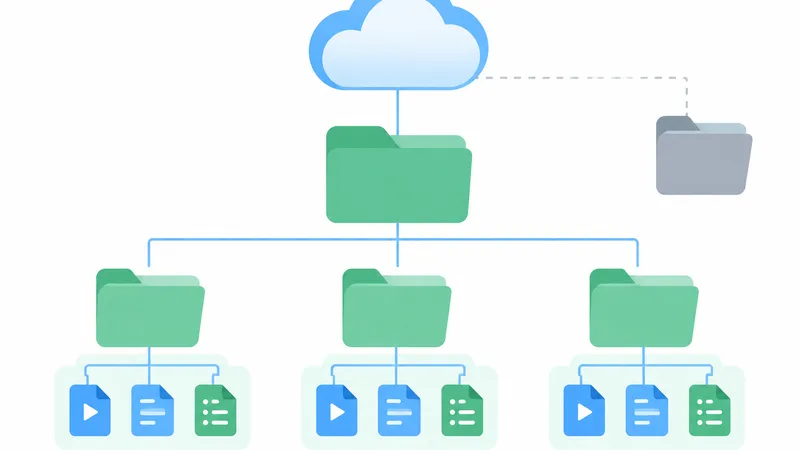
A Google Meet recording is saved as a video file in the organizer's My Drive, inside the Google Meet folder, in a sub-folder created for that meeting. According to Google's Workspace Updates announcement of July 22, 2026, the same sub-folder also collects the meeting's transcript and Gemini notes, and every instance of a recurring meeting shares one sub-folder. Before this change, Meet put files loose in a single Meet Recordings folder that was not organized by meeting.
To open it on a computer:
- Go to drive.google.com and sign in with the organizer's Google account.
- Click My Drive in the left menu.
- Open the Google Meet folder, then the sub-folder for the meeting.
- Double-click the recording to play it, or select it and use Share or More > Download.
The video includes the active speaker and anything presented. If the organizer turned off continuous meeting chat, Meet also saves the chat as an .SBV file in the organizer's Drive, which plays as subtitles in a player such as VLC. Captions are only kept if the person recording picked a caption language when starting; those captions play from the CC button in Drive's player, and Google warns they can appear a few hours after the video itself. All of this is described in Google's Record a video meeting help page.
What happened to the Meet Recordings folder in July 2026?
The Meet Recordings folder still exists, under a new name. Google renamed it Legacy Meet Recordings and moved it inside the new Google Meet folder. Google's help page says existing recording links keep working and that only new recordings go into the per-meeting sub-folders, so older files were not split up or re-sorted. The rollout started on July 22, 2026 for Rapid Release domains and on July 30, 2026 for Scheduled Release domains, and Google noted that both folder names may appear side by side for a short time during the transition.
Two details are easy to miss. First, Google's page on Gemini notes gives a different date for the same rename ("Starting September 2026") than the recording and transcript pages ("July 2026"), so an account may have switched later than July. Second, Google's own troubleshooting page still tells you to look in the Meet Recordings folder. If you only see one of the two folders, open whichever one exists; the other may simply not have been created or renamed yet. Workspace admins were also told to check any scripts or automations that rely on the old folder name or ID.
Where else can you find a Google Meet recording?
Besides the organizer's Drive, a Google Meet recording can be reached from three places: the notification email, the Google Calendar event and, for attendees with access, a shortcut in their own Drive.
- Email: when the recording is ready, Google sends a link to the meeting organizer and the person who started the recording. In Gmail, search for the meeting's title together with the word "recording", and check Spam if nothing turns up. The link opens a player where you can play, share, download or add the file to your Drive.
- Google Calendar: if the recording started during the scheduled meeting time, the link is attached to the Calendar event. Invited people in the organizer's organization get access automatically; groups do not.
- Your own Google Meet folder: since the July 2026 change, attendees who have access to a meeting's files see shortcuts to them in their own Google Meet folder in Drive.
One exception catches people out: if the organizer of the event changed, or the meeting ran outside the scheduled Calendar time, Google sends the recording link to the original event creator instead.
Who owns the recording when someone else records the meeting?
The meeting organizer owns a Google Meet recording no matter who pressed Record. A co-host, a colleague from the same organization or an outside guest promoted to co-host can start the recording, but the file is created in the organizer's Drive and the recorder only gets the email link. That means the organizer controls sharing, downloading and deleting.
Google defines the organizer by how the meeting was created. For a meeting scheduled in Google Calendar, the organizer is the person who created the Calendar event. For a meeting started from the Google Meet home page or another product such as Gmail, the organizer is the person who launched the meeting or generated the code. So if an assistant creates the event for a manager, the recording lands in the assistant's Drive.
When the organizer works for another company, the recording sits in that company's Drive. Automatic Calendar access only covers people in the organizer's own organization, so an outside guest has to ask the organizer to share the file, and the organizer's admin may not allow sharing outside the company. Google's recording troubleshooting page adds that if a shared recording cannot be downloaded, the owner has to untick Disable options to download, print, and copy for commenters and viewers in the file's sharing settings.
Google Meet Help does not describe a setting that saves new recordings straight to a shared drive: they go to the organizer's My Drive. Google Vault's retention documentation does refer to Meet recordings kept in shared drives, so a team can still store copies there, but that is a step taken after the meeting.

Summarize your meetings & videos automatically with NoteMeeting
Google Meet, Zoom, YouTube, Podcast — all in one extension.
Where do Google Meet transcripts and Gemini notes go?
Google Meet transcripts and Gemini "Take notes for me" notes go to the same place as recordings: the organizer's Google Meet folder, in the meeting's sub-folder. They are separate files, and the people who get the email are different for each feature.
| File | Saved in | Email link goes to | Calendar event |
|---|---|---|---|
| Recording (video) | Organizer's Drive > Google Meet > meeting sub-folder | Organizer and the person who started the recording | Attached if recording started at the scheduled time |
| Transcript | Same sub-folder; a separate file each time Transcripts is started | Host, any co-hosts and the person who turned on Transcripts | Attached; invitees in the host's organization can open it, unless there are more than 200 of them |
| Gemini notes | Same sub-folder, as a Google Docs file with Quick notes and Full notes tabs | Whoever the organizer chose under "Send notes to" | Attached; access follows the notes' sharing settings |
| Chat log | Organizer's Drive, as an .SBV file (only when continuous chat is off) | Not emailed separately | No |
For transcripts, Google's Transcripts help page notes that longer meetings take longer to process, so the email can arrive well after the meeting. When there are more than 200 invitees in the host's organization, only the host, co-hosts and the person who turned on Transcripts can open the transcript. Step-by-step instructions for each file type are in our guides on getting a Google Meet transcript and on Gemini's Take notes for me in Google Meet.
How long does it take for a Google Meet recording to show up?
Google does not publish a processing time for Meet recordings. Its help pages only say the recording "must be generated" and is not available right after it ends, that longer meetings take longer to process, and that recorded captions can become playable a few hours after the video. Until the file is ready, Drive shows Still processing on it.
Google's troubleshooting page gives a workaround for that state: select the file in Drive, click More > Download and play the downloaded copy on your computer. Third-party guides quote anything from about 30 minutes to 24 hours, but none of them cites a current Google source, so treat those numbers as anecdotes. A practical rule: if the email has not arrived and the file is not in the organizer's Drive the next day, work through the causes below instead of waiting longer.
Google Meet recording not showing up? Causes and fixes
A missing Google Meet recording almost always comes down to one of eight causes. Start at the top; the first three explain most cases.
The recording is still processing
A Google Meet recording appears in Drive and in the email only after Google has generated it. Long meetings take longer. If the file shows "Still processing", download it to play it right away.
You are looking in the wrong Drive or account
The recording is in the organizer's Drive, not the recorder's. If you are the organizer, make sure the account picture at the top right of Drive is the account that created the Calendar event; people signed in to a work and a personal account at once often search the wrong one. In Drive's search bar, type:video plus a word from the meeting title narrows the results, and owner: followed by the organizer's email address finds files that person owns and shared with you (both operators are listed on Google Drive's search help page).
You are looking for the old folder name
Recordings made after the July 2026 change are in Google Meet, not Meet Recordings, and older ones are in Google Meet > Legacy Meet Recordings. A search for "Meet Recordings" can therefore return only the legacy folder.
The recording never started or failed
Meet records only from a computer or the Android app, and only when the organizer's Google Workspace edition or Google One plan (2 TB or more) includes recording, the admin turned recording on, and the meeting organizer has recording permission. Breakout rooms are never recorded. Recording also fails if the organizer's Drive or the organization's shared storage is full: Google says you cannot record when either quota is reached, even if your own Drive has space. A recording stops automatically after 8 hours. If the button itself was missing, our guide on why you can't record on Google Meet covers each requirement.
The organizer is someone else, or changed
If a colleague created the Calendar event, the recording is in that colleague's Drive. If the event's organizer was changed, or the call ran outside its scheduled time, the link went to the original event creator. Ask that person to share it.
It was deleted and is in the trash
Only the file's owner, the organizer, can delete a Google Meet recording; everyone else can only remove it from their own view. Deleted files stay in Drive's Trash for 30 days and can be restored with right-click > Restore, as described on Google Drive's recovery page. Searching is:trashed in Drive lists them. After the trash is emptied, a Google Workspace admin can still restore files deleted within the last 25 days from the Admin console.
An admin retention rule removed it
In a Google Workspace organization, retention rules in Google Vault decide how long Meet recordings are kept. By default Meet data follows the organization's Drive retention rules, and Google warns that an improperly configured Meet rule can "immediately and irreversibly purge recordings" (Retain Google Meet data with Vault). If recordings disappear after a fixed number of days, ask IT which retention rule applies.
The organizer's account was disabled
When an organizer leaves the company and their account is disabled, recording is also disabled for the recurring meetings they organized. Google's fix is to remove the meeting from the Calendar event, save it, and add a new meeting code so a new owner organizes it. For recordings already in that person's Drive, ask your admin, who manages the departed user's files.
How to find Google Meet recordings on iPhone and Android
On a phone, Google Meet recordings are found in the Google Drive app, not in the Meet app. Open Drive, go to My Drive, open the Google Meet folder and then the meeting's sub-folder, or search for the meeting title. The email link and the Calendar event work on phones too.
Recording itself works only on a computer or in the Android Meet app (More > Tools > Record). Google lists no iPhone or iPad option, so an iPhone user cannot start a Meet recording, but can still play one from Drive. A recording started on Android is saved in the organizer's Drive, exactly like one started on a computer. The steps for starting a recording on each device are in our guide on how to record a Google Meet.
What if you are not the organizer and need what was said?
If you are not the organizer, the only official route to a Google Meet recording is the organizer: ask for the file to be shared. For future meetings, the person who creates the Calendar event becomes the organizer, so creating the event yourself (on an account that can record) puts the files in your own Drive. If your personal Gmail account cannot record at all (recording needs a Google One plan with 2 TB or more), Meet will not save anything for you. In both cases, a tool that transcribes from your side of the call is the alternative for future meetings; our comparison of Google Meet note-taking extensions lists the options and their limits.
NoteMeeting is one of those options, with clear limits: the NoteMeeting Chrome extension creates a live transcript and an AI summary of the Google Meet call from your browser, and you download them yourself afterwards. It does not record video, does not retrieve or download Meet recordings, and no bot joins the meeting; NoteMeeting does not store the audio on its servers. The free trial covers 1 hour of audio for transcripts and summaries, and paid plans start at $6 a month (see NoteMeeting pricing). Tell the other participants you are transcribing, the same as you would before recording.
FAQ
Do Google Meet recordings go to the organizer or the person who recorded?
Google Meet recordings go to the meeting organizer's Google Drive. The person who started the recording receives an email with a link to the file, but the file is not copied to their Drive. The organizer owns it and controls sharing and deletion.
Where did my old Google Meet recordings go?
Recordings made before the July 2026 change are in the Legacy Meet Recordings folder, which is the old Meet Recordings folder renamed and moved inside the new Google Meet folder in My Drive. Google says old recording links continue to work. Google's Gemini notes page dates the same rename to September 2026, so some accounts may have changed later.
Does Google Meet save recordings automatically?
Google Meet saves a recording only if someone starts recording, or if the host turned on Record the meeting under Video call options > Meeting records when creating the event. Even then, auto-recording starts only once the host or a co-host joins on the web. Without one of these two, Meet does not record.
Can I change where Google Meet saves recordings?
No. Google Meet always saves new recordings to the organizer's My Drive in the Google Meet folder, and Google Meet Help documents no setting to send them elsewhere. After the meeting, the organizer can share the file or put a copy in another folder or a shared drive.
How long are Google Meet recordings kept?
Google Meet recordings stay in the organizer's Drive until someone deletes them; Google documents no automatic expiry for Meet recordings themselves. In a Workspace organization, an admin's Google Vault retention rules can delete them after a set period. Deleted recordings stay in the trash for 30 days.